Creating the Product for a Book
Marketing ITD
There are numerous types of products that can be created, including a variety of subscription models. This example is for creating a simple product with a fixed price.
Even though the books will be sold outside of this website on Learning Stream or UNC Press, it needs a product ID so it can be “sold” to the WordPress user when they login.
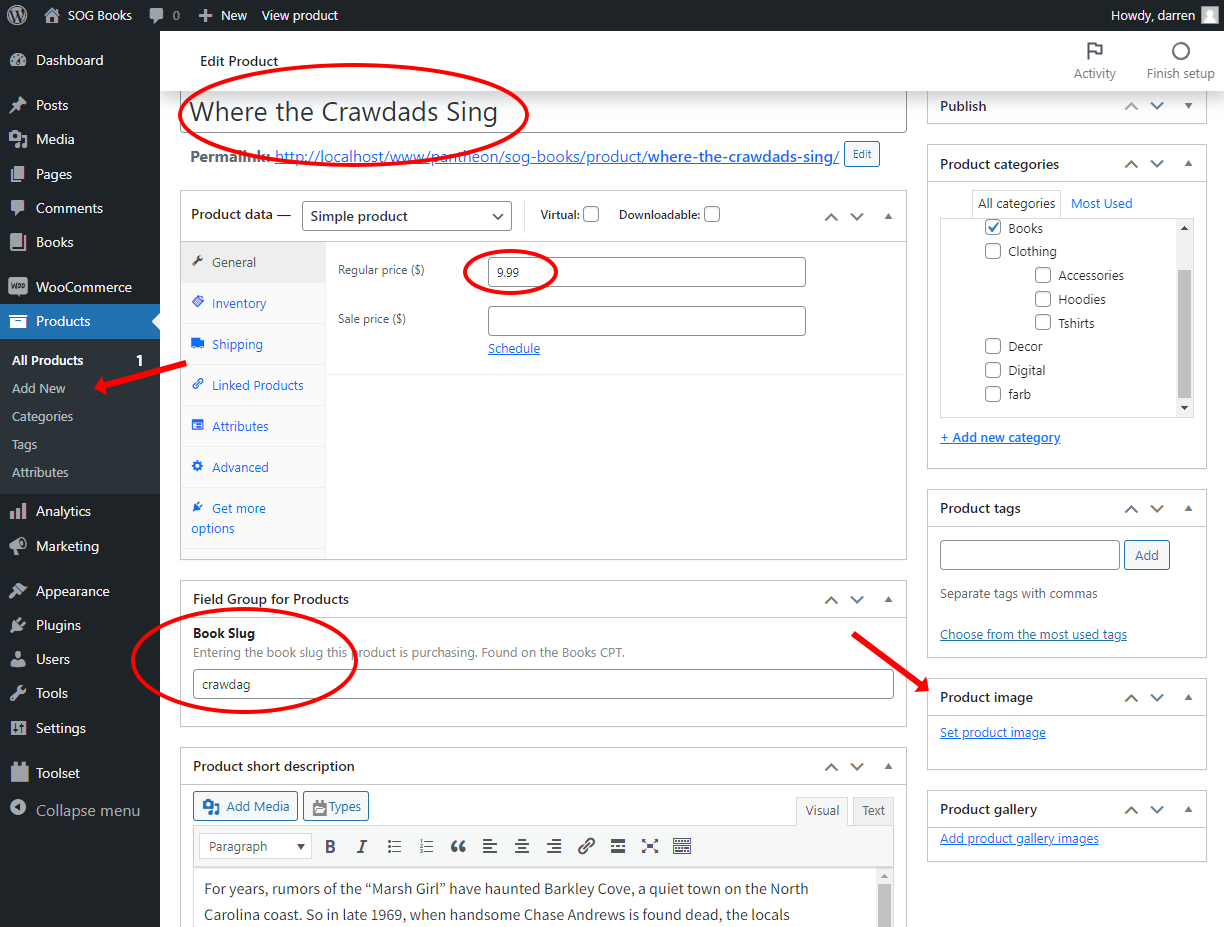
- In the products menu on the left click on Add New.
- Enter the product details.
- At a minimun give the product a title and a price.
- Giving it categories will help display it in the proper areas and market it with like products.
- Tags are usefule for the user to find similar books based on subjects or authors.
- You can also enter a description for the book and photos as well.
- If this product is directly linked to a single book, enter the slug for that book on this product.
- There are numerous options for selling books, such as subscriptions, sales, discounts, coupon codes, bundled with others etc. These helpful links will guide you in setting up a variety of different products. As always, ITD can help you confifure these.