Preparing Chapters on the Books Website
Publications
The importer tool works with paragraph and character styles from MS Word and formats them appropriately.
There are a number of steps that must still be done prior to publishing for the user. Fortunately most are automated!
When you load the book into the website each chapter will need to be “processed” and “approved” before it will be available to the user.
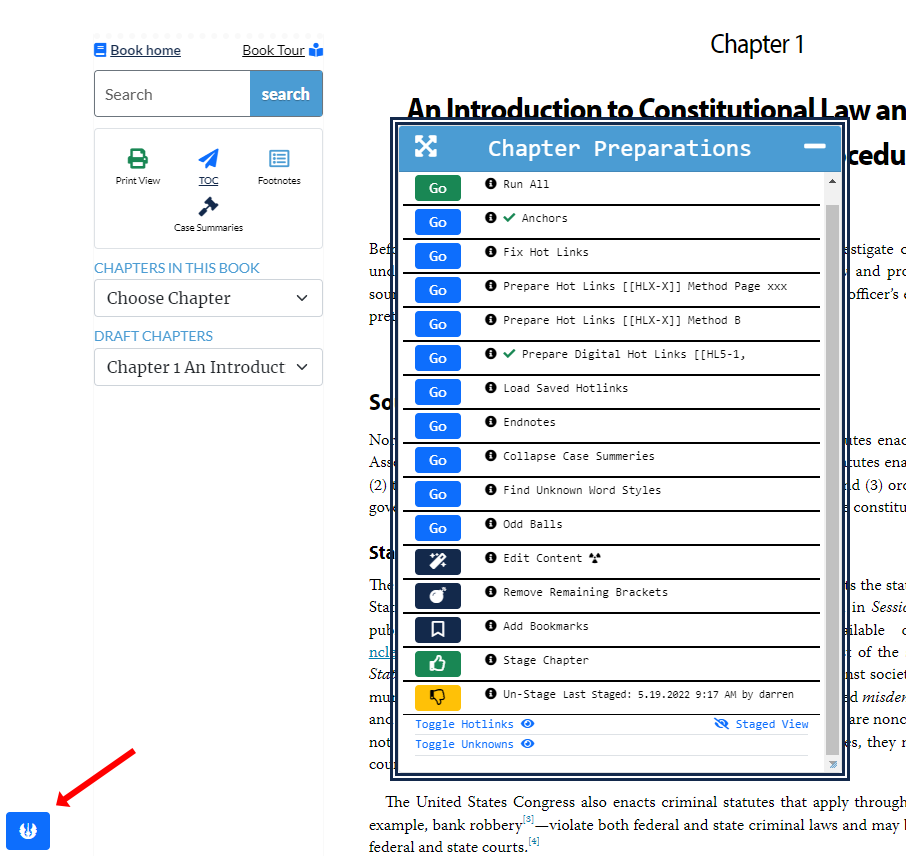
To access the chapter control panel click on the blue Jedi icon in the lower left corner of the page.
This menu will perform a number of tasks such as:
There are a number of steps that must still be done prior to publishing for the user. Fortunately most are automated!
When you load the book into the website each chapter will need to be “processed” and “approved” before it will be available to the user.
To access the chapter control panel click on the blue Jedi icon in the lower left corner of the page.
This menu will perform a number of tasks such as:
- Creates chapter anchors and hotlinks.
- Creates the inline footnotes.
- Finds unknown word styles that through the importer tool.
- Allows for custom tasks to be performed specific to each book.
- Finally, stages the chapter so it can be published for the user.